
Jak dodać logo do zdjęcia sferycznego w nadir czyli tam na dole

Tutorial jest krótki bo i procedura jest prosta.

Należy mieć zrobione okrągłe logo które poprzez opcję transformacji zmienimy w Rectangular.

Są to opcję transform Polar Coordinates.

Darmowy program Ibis Paint. A do panoramy dodamy w Photo Editor.
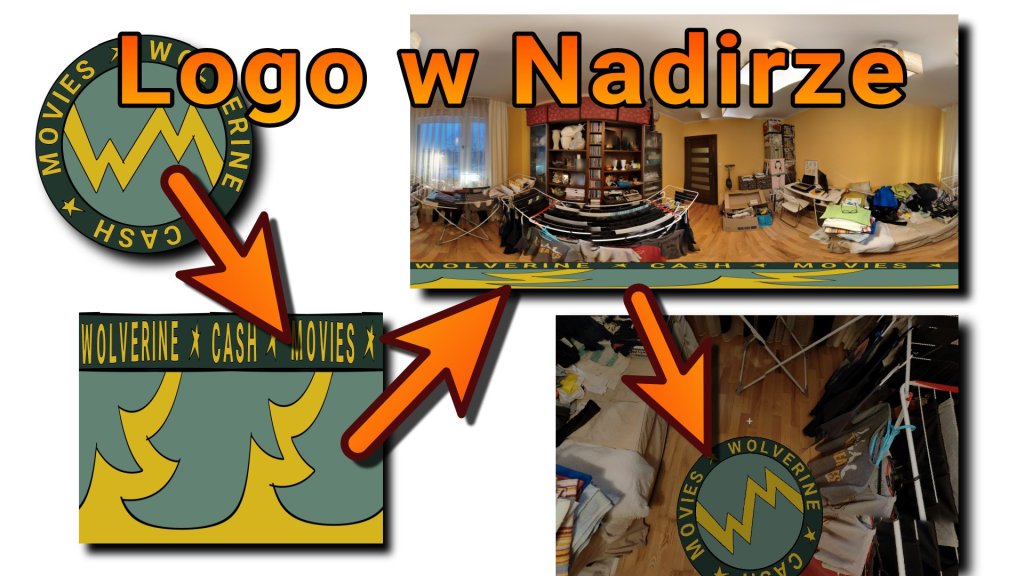
Logo w nadir czyli własny obrazek na spodzie panoramy sferycznej

Logo idealnie zasłoni nogi statywu lub nasze stopy.

Logo na dole panoramy to też super miejsce na promocję swoich usług

Dodaj komentarz

Informacje

Welcome to OnyxPulse, your premier source for all things Health Goth. Here, we blend the edges of technology, fashion, and fitness into a seamless narrative that both inspires and informs. Dive deep into the monochrome world of OnyxPulse, where cutting-edge meets street goth, and explore the pulse of a subculture defined by futurism and style.

Szukaj